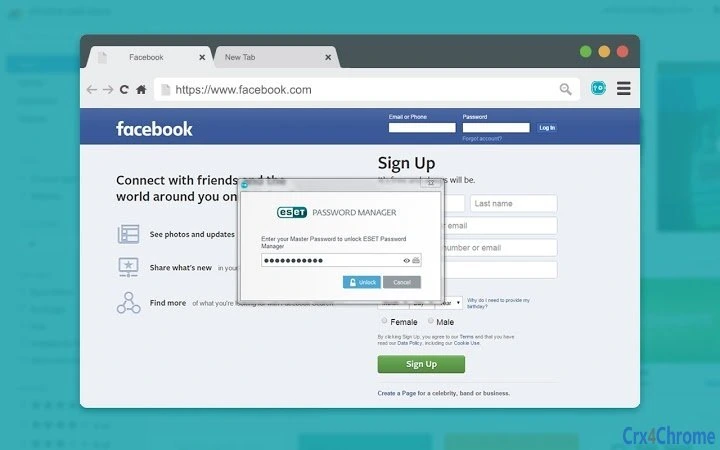

Secure Password Access with ESET
The ESET Password Manager extension app offers a streamlined solution for securely managing login credentials across websites and social networks. Designed for users who prioritize online safety, the tool enables access to stored credentials using a single master password, reducing the risk of password reuse and unauthorized access. It is intended for individuals and professionals who manage multiple accounts across various platforms and seek a reliable way to maintain strong, unique passwords without memorizing them.
By integrating directly into web browsers, the extension simplifies the login process, allowing users to auto-fill credentials with minimal effort. This is particularly useful for those frequently switching between work and personal accounts, or managing multiple subscriptions. The app supports both Windows and Mac operating systems, making it accessible to a broad audience. It is designed to complement ESET Smart Security Premium, requiring a valid license for full functionality. The developer did not provide additional system requirements, and exact performance details were not specified.
Key Features & Capabilities
- Master Password Protection: All stored credentials are secured behind a single master password, ensuring that sensitive data remains encrypted and inaccessible without authorization.
- Auto-Fill Browser Integration: The extension automatically fills login forms on websites and social media platforms, streamlining access and reducing the risk of typos or phishing attempts.
- Secure Credential Storage: Passwords and personal information are stored locally and encrypted, minimizing exposure to online threats.
- License-Dependent Functionality: Full access to the password manager requires a valid ESET Smart Security Premium license, ensuring that the tool is used within the broader security ecosystem.
- Cross-Platform Accessibility: Available on both Windows and Mac, allowing consistent password management across different devices.
Users benefit from reduced login friction while maintaining high security standards. For example, a remote worker managing multiple client accounts can quickly and safely access each platform without switching between password managers. Similarly, a household managing shared accounts can securely store and retrieve credentials using a single trusted source. The extension does not support cloud synchronization, which may limit accessibility across devices not running the same operating system.
User Interface, Workflow & Performance
The user interface of the ESET Password Manager extension is designed for simplicity and efficiency. It integrates directly into the browser’s toolbar, appearing as a small icon that users can click to access stored credentials. Navigation is intuitive, with minimal steps required to view, edit, or auto-fill passwords. The workflow is optimized for speed, enabling users to log in to websites in seconds.
While the developer did not specify resource usage details, the extension’s lightweight design suggests minimal impact on system performance. It is expected to operate smoothly in the background without significantly affecting browser speed or memory consumption. Stability is likely maintained through integration with ESET’s established security framework, though real-world behavior may vary depending on the browser and system configuration. No performance benchmarks or CPU/RAM usage data were provided.
Compatibility & System Requirements
The ESET Password Manager extension is compatible with both Windows and Mac operating systems. It is designed to function as a browser extension, requiring support from major web browsers such as Chrome, Firefox, and Edge. The software version is 1.0.0, with an installation size of 15.2 MB.
Exact system requirements were not listed by the developer. Compatibility information is limited to the operating systems mentioned. No specific hardware specifications, such as RAM or processor requirements, were provided. Users are advised to ensure their system meets the baseline requirements of their browser and operating system. The extension does not appear to require administrative privileges for installation, but this was not confirmed.
Pros and Cons
Pros
- Secure password management using a master password
- Seamless browser integration for quick login access
- Available for both Windows and Mac users
- Free to use with valid ESET Smart Security Premium license
- Minimal system footprint and efficient workflow
Cons
- Requires a valid ESET Smart Security Premium license for use
- No cloud synchronization across devices
- Limited to browser-based functionality
- Exact system requirements not disclosed
- May not support all third-party browsers
FAQ Section
Is the ESET Password Manager extension free to use?
Yes, the extension is available at no additional cost. However, it requires a valid license for ESET Smart Security Premium to function.
Can I use this tool on both Windows and Mac?
Yes, the extension is compatible with both Windows and Mac operating systems.
Does the extension support cloud syncing?
The developer did not provide information on cloud synchronization. The tool appears to rely on local storage, which may limit access across devices.
What license is required to use this extension?
A valid license for ESET Smart Security Premium is required to activate and use the ESET Password Manager extension.
Is the extension safe to install and use?
As a product developed by ESET, a recognized security provider, the extension is designed with security in mind. It uses encryption and master password protection to safeguard user data.
Final Thoughts
The ESET Password Manager extension delivers a focused, secure solution for managing online credentials. Its integration with ESET’s broader security suite ensures a consistent and reliable experience for users already invested in the ecosystem. While it lacks advanced features like cross-device syncing, its core functionality is solid and well-executed. The requirement for a premium license may limit accessibility, but for existing ESET users, it offers a valuable addition to their digital protection toolkit.
Those who manage multiple online accounts and prioritize security will benefit most from this tool. Its simplicity, strong encryption, and seamless browser integration make it a practical choice for everyday use. For users already using ESET Smart Security Premium, this extension enhances their online safety without adding complexity.
Download ESET Password Manager now







